
Pre-click capture
Screenshots show the moment before the click — not the page after it changed.
Start recording and work as usual. Manual Maker logs clicks and inputs, captures each step, drafts with Solar Pro 3, optionally self-checks, then exports to Word, PDF, Markdown, ZIP, or Claude Skill.
Until paid plans launch, every feature is free with no page limits.
Real screens
Popup, editor, and annotation tools connect in one workflow.
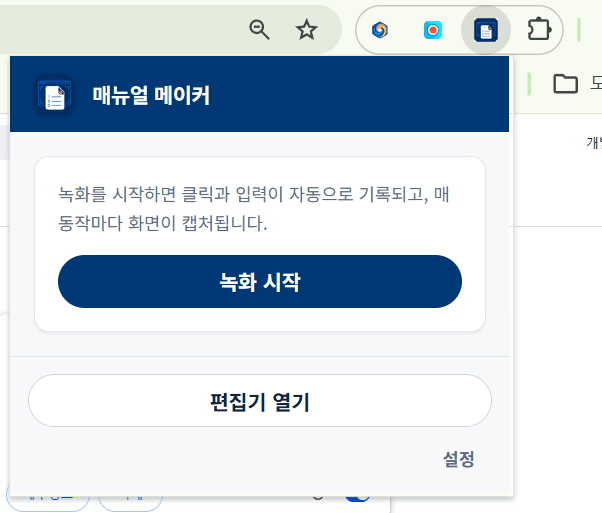
Record from the popup
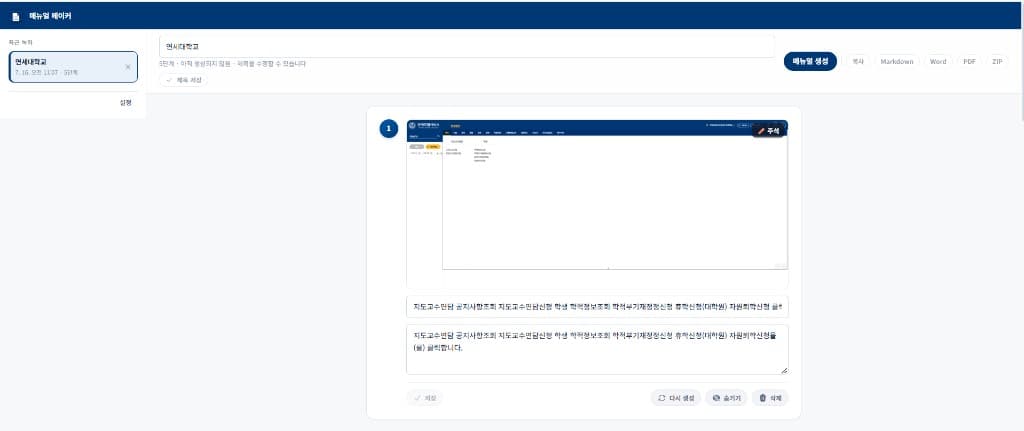
Edit steps in the editor
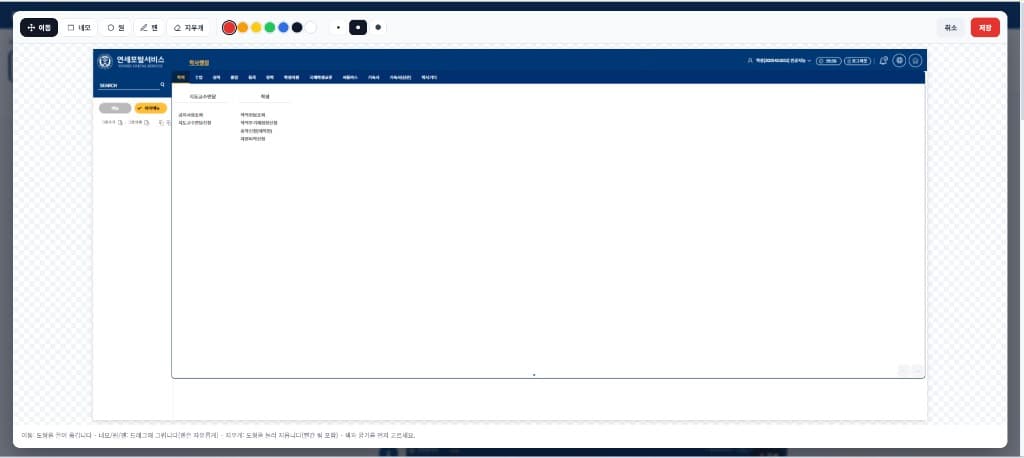
Annotate screenshots
Workflow
From recording to review, export, and walkthrough in one flow.
One click in the extension popup on the page you want to document.
Clicks, typing, and menus are logged with a red outline on each capture. Actions in window.open() popups are recorded too.
The editor opens automatically with your captured steps.
Solar Pro 3 writes step titles and instructions from the action log, accessible names, and screen context.
In agent mode, each step is checked against the recording. Weak steps are rewritten with neighbor context (up to 2 rounds), then the loop stops.
Edit steps, annotate screenshots, export Markdown, Word, PDF, ZIP, or Claude Skill — or play a full-screen slideshow.
Accuracy
Action logs, DOM context, and an optional agent loop keep manuals grounded.
Screenshots show the moment before the click — not the page after it changed.
In dense or overlapping UIs, the element under the cursor is chosen — not a wrapping container.
Clicks and Enter that open a new page are still committed, even as the page moves away.
Draft → evaluate → rewrite only weak steps (up to 2 rounds). Stops when every step passes.
Steps you fix by hand are never overwritten by AI regeneration.
Clicks without an identifiable target are auto-hidden with a reason — and can be restored.
Features
Capture, generate, edit, present, and export in one place.
Clicks, double-clicks, right-clicks, typing, dropdowns, checkboxes, and shortcuts — in order.
Action log → Chat draft → optional agent self-review. Tune reasoning effort in settings.
Edit titles and bodies, hide or delete steps, regenerate one step, or insert your own between steps.
Boxes, ellipses, fills, and freehand pen — baked into exports.
Full-screen walkthrough with keyboard, autoplay, side-click zones, and bottom dots.
Password- and ID-like fields are masked as •••••••• and can be blurred in screenshots.
Export
Documents for sharing — plus a Claude Skill package when you want an AI to follow the same workflow.
Compare
| Item | Free | Pro |
|---|---|---|
| Screen recording & capture | ✓ | ✓ |
| AI manual generation + self-review | ✓ | ✓ |
| Slideshow presentation mode | ✓ | ✓ |
| Manual page limit | Up to 10 pages | Unlimited |
| Markdown · Word · PDF · ZIP · Claude Skill | ✓ | ✓ |
| Lifetime Pro license key | — | ✓ |
| Future Pro-only features | — | ✓ |
| Billing | Free | One-time · lifetime |
Safety & compliance
Manual Maker documents workflows you choose to record. It is not employee monitoring or covert surveillance software.
Recording begins only when the user clicks Record in the extension popup. We do not support background, remote, or non-consensual automatic recording.
The product is not designed or sold to secretly monitor employees or track others without consent. Such use violates our Terms.
Password-like and national-ID-style inputs are masked and can be blurred in screenshots. Use for credential harvesting is prohibited.
A Chrome extension that turns screen recordings and click logs—started by the user—into step-by-step user guides with AI assistance.
Privacy
Recordings, images, and video live in IndexedDB. When you generate a manual or export a Claude Skill, only the action log and manual text go to Upstage — screenshots are not sent.
Pricing
Everything is free today. After paid plans launch, Pro unlocks unlimited manuals.
$0
₩5,000One-time · lifetime
FAQ
A Chrome extension that turns screen recordings and click logs—started by you—into step-by-step user guides with AI. You choose what to document.
Yes. Recording starts only when you click Record in the extension popup. It cannot run automatically without your action.
No. Employee surveillance, covert recording, and credential harvesting are prohibited. Sensitive inputs are masked and can be blurred.
Password- and ID-like fields are masked; screenshots can be blurred. Recordings stay in your browser. When you generate a manual or export a Claude Skill, only action logs and manual text are sent to Upstage — screenshots are not uploaded.
Markdown, Word (.docx), PDF, ZIP (with images and optional video), and a Claude Skill ZIP (skill.md + screenshots) ready to upload to Claude.
A full-screen presentation of your steps for walkthroughs and training — with keyboard navigation, autoplay, side-click zones, and bottom dots. It works even before AI generation using draft step text.
Right now, before paid plans launch, every feature is free. After launch, Free covers manuals up to 10 pages; beyond that requires a one-time lifetime Pro license.
Most web pages work. Internal browser pages such as chrome:// may be restricted.
You may request a full refund within 14 days of purchase with no exceptions or conditions. See our Refund Policy for details.
Add to Chrome and ship your first guide — or support the project if it helped.
Optional tip — keeps Manual Maker improving.
결제는 Paddle(https://paddle.com)을 통해 처리됩니다. 해외 결제 시 환율·세금에 따라 청구 금액이 달라질 수 있습니다.
Payments and refunds follow Paddle Merchant of Record policies.
By paying you agree to the Terms, Privacy Policy, and Refund Policy.